🚀 New:Nano Banana 2 Lite available!Try it now →
A modern minimalist evening dress, flowing silk fabric, deep emerald green, asymmetric neckline, floor-length, elegant draping, studio photography, white background
transform this sketch (image 1) into a water color hand drawn illustration of a piece of garment in two views, apply it with mostly light yellow and brown  wool fabric. maintain all design details of the garment from the original sketch, just fill colour and texture to it. output the drawing using the water colour visual style from image 2.
based on image 1, lets replace the sweater with the green sweater from image 2, and replace the pants with the dress from image 3.
let's replace the pants with a summer dress, lightweight linen, natural beige, relaxed fit, breathable texture, beach resort aesthetic. keep the t-shirt and the rest of the image unchanged.
Based on the current lookbook, extracting styles and colours from it, and create a new image of one model wear some new pieces of garment  - A hoodie in dark colour, and light color shorts, on beige background like the original image. remove the line on the edge of the image, keep out put with clean background.
change the dress's color to navy blue, and keep the rest unchanged
turn the t-shirt sleeves into a roll-up style sleeve, and keep everything else unchanged.
Let's create a fashion model wearing the following garments and accessories posing in front of a mirror in a bedroom.

- Top: Silk blouse, ivory, bow detail
- Bottom: High-waisted trousers, wide leg, camel
- Outerwear: Tailored blazer, neutral beige
- Accessories: Leather belt, gold hardware

natural lighting, bright room, realistic mobile phone photo style.
let's use the garment pieces from the image, and make a new image that shows them in hanger display style with a retail presentation look.

Make sure the garments (shirt/pants/blazer) are hang on three separate hanger. no model present.
Based on the provided blazer garment design, let's create a technical flat sketch on this women's blazer, front view, pay attention to the design details of it, three buttons, proportion, with a clean line drawing
A modern minimalist evening dress, flowing silk fabric, deep emerald green, asymmetric neckline, floor-length, elegant draping, studio photography, white background
transform this sketch (image 1) into a water color hand drawn illustration of a piece of garment in two views, apply it with mostly light yellow and brown  wool fabric. maintain all design details of the garment from the original sketch, just fill colour and texture to it. output the drawing using the water colour visual style from image 2.
based on image 1, lets replace the sweater with the green sweater from image 2, and replace the pants with the dress from image 3.
let's replace the pants with a summer dress, lightweight linen, natural beige, relaxed fit, breathable texture, beach resort aesthetic. keep the t-shirt and the rest of the image unchanged.
Based on the current lookbook, extracting styles and colours from it, and create a new image of one model wear some new pieces of garment  - A hoodie in dark colour, and light color shorts, on beige background like the original image. remove the line on the edge of the image, keep out put with clean background.
change the dress's color to navy blue, and keep the rest unchanged
turn the t-shirt sleeves into a roll-up style sleeve, and keep everything else unchanged.
Let's create a fashion model wearing the following garments and accessories posing in front of a mirror in a bedroom.

- Top: Silk blouse, ivory, bow detail
- Bottom: High-waisted trousers, wide leg, camel
- Outerwear: Tailored blazer, neutral beige
- Accessories: Leather belt, gold hardware

natural lighting, bright room, realistic mobile phone photo style.
let's use the garment pieces from the image, and make a new image that shows them in hanger display style with a retail presentation look.

Make sure the garments (shirt/pants/blazer) are hang on three separate hanger. no model present.
Based on the provided blazer garment design, let's create a technical flat sketch on this women's blazer, front view, pay attention to the design details of it, three buttons, proportion, with a clean line drawing
A modern minimalist evening dress, flowing silk fabric, deep emerald green, asymmetric neckline, floor-length, elegant draping, studio photography, white background
transform this sketch (image 1) into a water color hand drawn illustration of a piece of garment in two views, apply it with mostly light yellow and brown  wool fabric. maintain all design details of the garment from the original sketch, just fill colour and texture to it. output the drawing using the water colour visual style from image 2.
based on image 1, lets replace the sweater with the green sweater from image 2, and replace the pants with the dress from image 3.
let's replace the pants with a summer dress, lightweight linen, natural beige, relaxed fit, breathable texture, beach resort aesthetic. keep the t-shirt and the rest of the image unchanged.
Based on the current lookbook, extracting styles and colours from it, and create a new image of one model wear some new pieces of garment  - A hoodie in dark colour, and light color shorts, on beige background like the original image. remove the line on the edge of the image, keep out put with clean background.
change the dress's color to navy blue, and keep the rest unchanged
turn the t-shirt sleeves into a roll-up style sleeve, and keep everything else unchanged.
Let's create a fashion model wearing the following garments and accessories posing in front of a mirror in a bedroom.

- Top: Silk blouse, ivory, bow detail
- Bottom: High-waisted trousers, wide leg, camel
- Outerwear: Tailored blazer, neutral beige
- Accessories: Leather belt, gold hardware

natural lighting, bright room, realistic mobile phone photo style.
let's use the garment pieces from the image, and make a new image that shows them in hanger display style with a retail presentation look.

Make sure the garments (shirt/pants/blazer) are hang on three separate hanger. no model present.
Based on the provided blazer garment design, let's create a technical flat sketch on this women's blazer, front view, pay attention to the design details of it, three buttons, proportion, with a clean line drawing
A modern minimalist evening dress, flowing silk fabric, deep emerald green, asymmetric neckline, floor-length, elegant draping, studio photography, white background
transform this sketch (image 1) into a water color hand drawn illustration of a piece of garment in two views, apply it with mostly light yellow and brown  wool fabric. maintain all design details of the garment from the original sketch, just fill colour and texture to it. output the drawing using the water colour visual style from image 2.
based on image 1, lets replace the sweater with the green sweater from image 2, and replace the pants with the dress from image 3.
let's replace the pants with a summer dress, lightweight linen, natural beige, relaxed fit, breathable texture, beach resort aesthetic. keep the t-shirt and the rest of the image unchanged.
Based on the current lookbook, extracting styles and colours from it, and create a new image of one model wear some new pieces of garment  - A hoodie in dark colour, and light color shorts, on beige background like the original image. remove the line on the edge of the image, keep out put with clean background.
change the dress's color to navy blue, and keep the rest unchanged
turn the t-shirt sleeves into a roll-up style sleeve, and keep everything else unchanged.
Let's create a fashion model wearing the following garments and accessories posing in front of a mirror in a bedroom.

- Top: Silk blouse, ivory, bow detail
- Bottom: High-waisted trousers, wide leg, camel
- Outerwear: Tailored blazer, neutral beige
- Accessories: Leather belt, gold hardware

natural lighting, bright room, realistic mobile phone photo style.
let's use the garment pieces from the image, and make a new image that shows them in hanger display style with a retail presentation look.

Make sure the garments (shirt/pants/blazer) are hang on three separate hanger. no model present.
Based on the provided blazer garment design, let's create a technical flat sketch on this women's blazer, front view, pay attention to the design details of it, three buttons, proportion, with a clean line drawing
A modern minimalist evening dress, flowing silk fabric, deep emerald green, asymmetric neckline, floor-length, elegant draping, studio photography, white background
transform this sketch (image 1) into a water color hand drawn illustration of a piece of garment in two views, apply it with mostly light yellow and brown  wool fabric. maintain all design details of the garment from the original sketch, just fill colour and texture to it. output the drawing using the water colour visual style from image 2.
based on image 1, lets replace the sweater with the green sweater from image 2, and replace the pants with the dress from image 3.
let's replace the pants with a summer dress, lightweight linen, natural beige, relaxed fit, breathable texture, beach resort aesthetic. keep the t-shirt and the rest of the image unchanged.
Based on the current lookbook, extracting styles and colours from it, and create a new image of one model wear some new pieces of garment  - A hoodie in dark colour, and light color shorts, on beige background like the original image. remove the line on the edge of the image, keep out put with clean background.
change the dress's color to navy blue, and keep the rest unchanged
turn the t-shirt sleeves into a roll-up style sleeve, and keep everything else unchanged.
Let's create a fashion model wearing the following garments and accessories posing in front of a mirror in a bedroom.

- Top: Silk blouse, ivory, bow detail
- Bottom: High-waisted trousers, wide leg, camel
- Outerwear: Tailored blazer, neutral beige
- Accessories: Leather belt, gold hardware

natural lighting, bright room, realistic mobile phone photo style.
let's use the garment pieces from the image, and make a new image that shows them in hanger display style with a retail presentation look.

Make sure the garments (shirt/pants/blazer) are hang on three separate hanger. no model present.
Based on the provided blazer garment design, let's create a technical flat sketch on this women's blazer, front view, pay attention to the design details of it, three buttons, proportion, with a clean line drawing
A modern minimalist evening dress, flowing silk fabric, deep emerald green, asymmetric neckline, floor-length, elegant draping, studio photography, white background
transform this sketch (image 1) into a water color hand drawn illustration of a piece of garment in two views, apply it with mostly light yellow and brown  wool fabric. maintain all design details of the garment from the original sketch, just fill colour and texture to it. output the drawing using the water colour visual style from image 2.
based on image 1, lets replace the sweater with the green sweater from image 2, and replace the pants with the dress from image 3.
let's replace the pants with a summer dress, lightweight linen, natural beige, relaxed fit, breathable texture, beach resort aesthetic. keep the t-shirt and the rest of the image unchanged.
Based on the current lookbook, extracting styles and colours from it, and create a new image of one model wear some new pieces of garment  - A hoodie in dark colour, and light color shorts, on beige background like the original image. remove the line on the edge of the image, keep out put with clean background.
change the dress's color to navy blue, and keep the rest unchanged
turn the t-shirt sleeves into a roll-up style sleeve, and keep everything else unchanged.
Let's create a fashion model wearing the following garments and accessories posing in front of a mirror in a bedroom.

- Top: Silk blouse, ivory, bow detail
- Bottom: High-waisted trousers, wide leg, camel
- Outerwear: Tailored blazer, neutral beige
- Accessories: Leather belt, gold hardware

natural lighting, bright room, realistic mobile phone photo style.
let's use the garment pieces from the image, and make a new image that shows them in hanger display style with a retail presentation look.

Make sure the garments (shirt/pants/blazer) are hang on three separate hanger. no model present.
Based on the provided blazer garment design, let's create a technical flat sketch on this women's blazer, front view, pay attention to the design details of it, three buttons, proportion, with a clean line drawing
A modern minimalist evening dress, flowing silk fabric, deep emerald green, asymmetric neckline, floor-length, elegant draping, studio photography, white background
transform this sketch (image 1) into a water color hand drawn illustration of a piece of garment in two views, apply it with mostly light yellow and brown  wool fabric. maintain all design details of the garment from the original sketch, just fill colour and texture to it. output the drawing using the water colour visual style from image 2.
based on image 1, lets replace the sweater with the green sweater from image 2, and replace the pants with the dress from image 3.
let's replace the pants with a summer dress, lightweight linen, natural beige, relaxed fit, breathable texture, beach resort aesthetic. keep the t-shirt and the rest of the image unchanged.
Based on the current lookbook, extracting styles and colours from it, and create a new image of one model wear some new pieces of garment  - A hoodie in dark colour, and light color shorts, on beige background like the original image. remove the line on the edge of the image, keep out put with clean background.
change the dress's color to navy blue, and keep the rest unchanged
turn the t-shirt sleeves into a roll-up style sleeve, and keep everything else unchanged.
Let's create a fashion model wearing the following garments and accessories posing in front of a mirror in a bedroom.

- Top: Silk blouse, ivory, bow detail
- Bottom: High-waisted trousers, wide leg, camel
- Outerwear: Tailored blazer, neutral beige
- Accessories: Leather belt, gold hardware

natural lighting, bright room, realistic mobile phone photo style.
let's use the garment pieces from the image, and make a new image that shows them in hanger display style with a retail presentation look.

Make sure the garments (shirt/pants/blazer) are hang on three separate hanger. no model present.
Based on the provided blazer garment design, let's create a technical flat sketch on this women's blazer, front view, pay attention to the design details of it, three buttons, proportion, with a clean line drawing
A modern minimalist evening dress, flowing silk fabric, deep emerald green, asymmetric neckline, floor-length, elegant draping, studio photography, white background
transform this sketch (image 1) into a water color hand drawn illustration of a piece of garment in two views, apply it with mostly light yellow and brown  wool fabric. maintain all design details of the garment from the original sketch, just fill colour and texture to it. output the drawing using the water colour visual style from image 2.
based on image 1, lets replace the sweater with the green sweater from image 2, and replace the pants with the dress from image 3.
let's replace the pants with a summer dress, lightweight linen, natural beige, relaxed fit, breathable texture, beach resort aesthetic. keep the t-shirt and the rest of the image unchanged.
Based on the current lookbook, extracting styles and colours from it, and create a new image of one model wear some new pieces of garment  - A hoodie in dark colour, and light color shorts, on beige background like the original image. remove the line on the edge of the image, keep out put with clean background.
change the dress's color to navy blue, and keep the rest unchanged
turn the t-shirt sleeves into a roll-up style sleeve, and keep everything else unchanged.
Let's create a fashion model wearing the following garments and accessories posing in front of a mirror in a bedroom.

- Top: Silk blouse, ivory, bow detail
- Bottom: High-waisted trousers, wide leg, camel
- Outerwear: Tailored blazer, neutral beige
- Accessories: Leather belt, gold hardware

natural lighting, bright room, realistic mobile phone photo style.
let's use the garment pieces from the image, and make a new image that shows them in hanger display style with a retail presentation look.

Make sure the garments (shirt/pants/blazer) are hang on three separate hanger. no model present.
Based on the provided blazer garment design, let's create a technical flat sketch on this women's blazer, front view, pay attention to the design details of it, three buttons, proportion, with a clean line drawing
A modern minimalist evening dress, flowing silk fabric, deep emerald green, asymmetric neckline, floor-length, elegant draping, studio photography, white background
transform this sketch (image 1) into a water color hand drawn illustration of a piece of garment in two views, apply it with mostly light yellow and brown  wool fabric. maintain all design details of the garment from the original sketch, just fill colour and texture to it. output the drawing using the water colour visual style from image 2.
based on image 1, lets replace the sweater with the green sweater from image 2, and replace the pants with the dress from image 3.
let's replace the pants with a summer dress, lightweight linen, natural beige, relaxed fit, breathable texture, beach resort aesthetic. keep the t-shirt and the rest of the image unchanged.
Based on the current lookbook, extracting styles and colours from it, and create a new image of one model wear some new pieces of garment  - A hoodie in dark colour, and light color shorts, on beige background like the original image. remove the line on the edge of the image, keep out put with clean background.
change the dress's color to navy blue, and keep the rest unchanged
turn the t-shirt sleeves into a roll-up style sleeve, and keep everything else unchanged.
Let's create a fashion model wearing the following garments and accessories posing in front of a mirror in a bedroom.

- Top: Silk blouse, ivory, bow detail
- Bottom: High-waisted trousers, wide leg, camel
- Outerwear: Tailored blazer, neutral beige
- Accessories: Leather belt, gold hardware

natural lighting, bright room, realistic mobile phone photo style.
let's use the garment pieces from the image, and make a new image that shows them in hanger display style with a retail presentation look.

Make sure the garments (shirt/pants/blazer) are hang on three separate hanger. no model present.
Based on the provided blazer garment design, let's create a technical flat sketch on this women's blazer, front view, pay attention to the design details of it, three buttons, proportion, with a clean line drawing
A modern minimalist evening dress, flowing silk fabric, deep emerald green, asymmetric neckline, floor-length, elegant draping, studio photography, white background
transform this sketch (image 1) into a water color hand drawn illustration of a piece of garment in two views, apply it with mostly light yellow and brown  wool fabric. maintain all design details of the garment from the original sketch, just fill colour and texture to it. output the drawing using the water colour visual style from image 2.
based on image 1, lets replace the sweater with the green sweater from image 2, and replace the pants with the dress from image 3.
let's replace the pants with a summer dress, lightweight linen, natural beige, relaxed fit, breathable texture, beach resort aesthetic. keep the t-shirt and the rest of the image unchanged.
Based on the current lookbook, extracting styles and colours from it, and create a new image of one model wear some new pieces of garment  - A hoodie in dark colour, and light color shorts, on beige background like the original image. remove the line on the edge of the image, keep out put with clean background.
change the dress's color to navy blue, and keep the rest unchanged
turn the t-shirt sleeves into a roll-up style sleeve, and keep everything else unchanged.
Let's create a fashion model wearing the following garments and accessories posing in front of a mirror in a bedroom.

- Top: Silk blouse, ivory, bow detail
- Bottom: High-waisted trousers, wide leg, camel
- Outerwear: Tailored blazer, neutral beige
- Accessories: Leather belt, gold hardware

natural lighting, bright room, realistic mobile phone photo style.
let's use the garment pieces from the image, and make a new image that shows them in hanger display style with a retail presentation look.

Make sure the garments (shirt/pants/blazer) are hang on three separate hanger. no model present.
Based on the provided blazer garment design, let's create a technical flat sketch on this women's blazer, front view, pay attention to the design details of it, three buttons, proportion, with a clean line drawing

AI Fashion Design: From Sketch to Runway with Banana Designer

Use AI outfit generation to turn sketches, references, and technical ideas into production-ready fashion visuals. Create garment variations, test fabrics, and build full collections without manual rendering.

fashion-designAI outfit generatordesignclothing design

AI Fashion Design: From Sketch to Runway with Banana Designer

Fashion design today is no longer just about sketching pretty outfits on paper. Brands, designers, and studios need to:

  • Visualize garments across multiple colors, fabrics, and cuts
  • Turn sketches into photorealistic mockups
  • Adapt runway trends into brand-ready pieces
  • Build full collections on tight timelines and budgets

Traditional workflows make this slow and expensive: you redraw every variation, prepare new mockups for every client change, and wait on manual rendering or sampling.

Banana Designer’s AI outfit generator turns this into an iterative, fast, and visual process. You can generate garment ideas from text, render sketches, reuse references, and build full collections—while still keeping design control in your hands.

This page focuses on advanced fashion design techniques with AI: how to go from concept to collection using multi-model workflows, fabric-aware rendering, and precision editing.


Why AI Fashion Design?

The Traditional Fashion Design Challenge

Fashion designers and clothing brands face time-consuming, fragmented workflows:

  • Manual rendering for each design and colorway
  • Limited iterations because every variation costs time and money
  • Slow client approvals that depend on finished mockups or samples
  • Difficult fabric visualization, especially for complex textures
  • Seasonal and trend variations that require repeating the same work again and again

The AI Fashion Design Solution

With Banana Designer’s AI outfit generator, you can move much faster without losing control over your design language:

✅ Instant visualization – Turn text, sketches, or references into garment mockups in seconds
✅ Unlimited variations – Test colors, patterns, and fabrics at scale
✅ Sketch-to-design – Convert rough sketches into polished visuals
✅ Fabric-aware textures – Show silk, denim, leather, cotton, knits, and more
✅ Collection-level exploration – Generate families of looks that share the same aesthetic
✅ Client-ready mockups – Export presentation-quality assets without external rendering


AI Fashion Design Workflow

In Banana Designer, most fashion workflows fall into three advanced patterns. You can combine them in one project depending on where you start: text, sketch, or reference.

Method 1: Text-to-Fashion Design

Best for: Early concept exploration and mood-driven ideas.

Start with a descriptive sentence or paragraph:

Example Prompt:

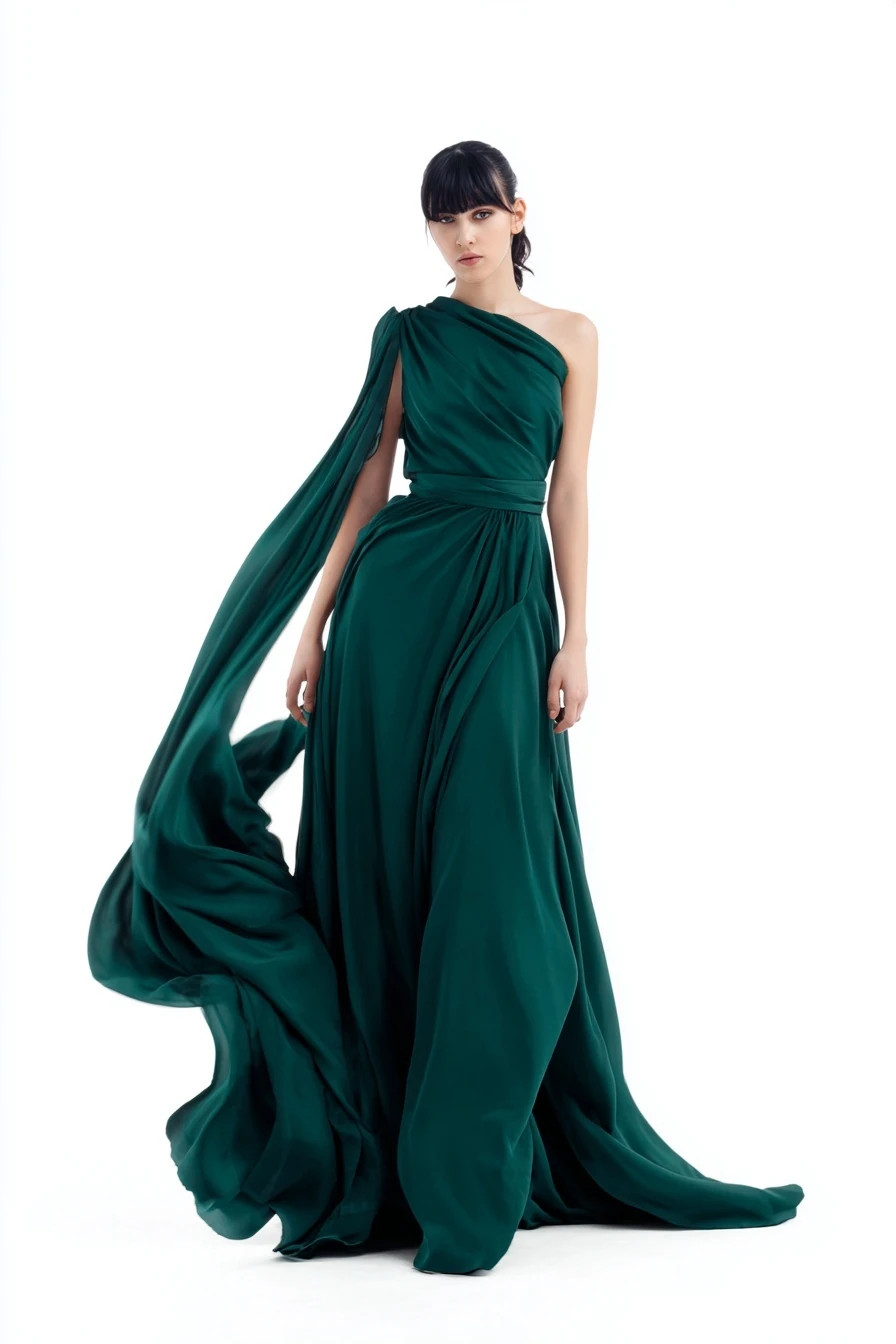
A modern minimalist evening dress, flowing silk fabric, deep emerald green, asymmetric neckline, floor-length, elegant draping, studio photography, white background

What You Get:

  • Photorealistic garment visualization
  • Directionally accurate fabric and drape
  • Clean, presentation-ready framing
  • Multiple variations by tweaking the prompt

Typical Uses:

  • Brainstorming new collections
  • Exploring trend-based silhouettes and palettes
  • Generating mood-board and lookbook material
  • First-round visuals for client or internal review
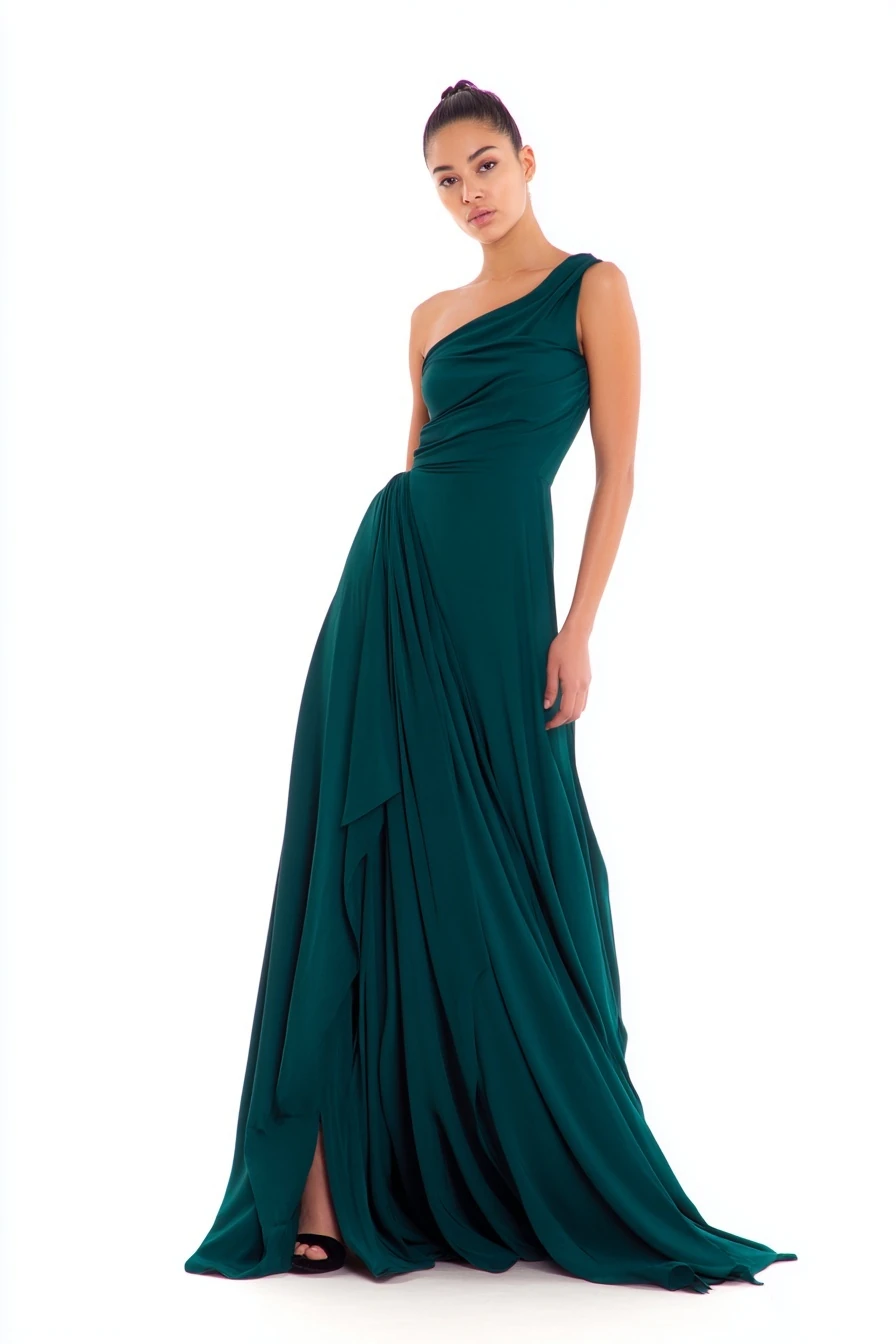
A modern minimalist evening dress, flowing silk fabric, deep emerald green, asymmetric neckline, floor-length, elegant draping, studio photography, white backgroundA modern minimalist evening dress, flowing silk fabric, deep emerald green, asymmetric neckline, floor-length, elegant draping, studio photography, white backgroundA modern minimalist evening dress, flowing silk fabric, deep emerald green, asymmetric neckline, floor-length, elegant draping, studio photography, white backgroundA modern minimalist evening dress, flowing silk fabric, deep emerald green, asymmetric neckline, floor-length, elegant draping, studio photography, white background
3 / 4

A modern minimalist evening dress, flowing silk fabric, deep emerald green, asymmetric neckline, floor-length, elegant draping, studio photography, white background

Midjourney•Text to ImageFast4 credits

Best Model: MidJourney for highly creative, photorealistic garments with strong fabric and lighting.


Method 2: Sketch-to-Design Rendering

Best for: Preserving design intent while upgrading visuals.

You already have a sketch—digital or on paper—but need a polished visual that respects your lines and proportions.

Workflow:

  1. Upload the sketch – A flat or fashion illustration.
  2. Describe the garment – Fabric, color, styling, and target aesthetic.
  3. Generate the render – AI converts lines into a fully rendered garment.
  4. Refine – Use precision editing for details like neckline, sleeves, or trims.

Example Transformation:

  • Input: Black-and-white sketch of a blazer dress
  • Output: Full-color, textured mockup with defined fabric (twill, wool, or linen), proper lighting, and ready for client decks or online use

Benefits:

  • Keep your design language and silhouette
  • Upgrade rough sketches to professional visuals
  • Quickly test color and material options from the same base
  • Communicate ideas to pattern makers and stakeholders more clearly
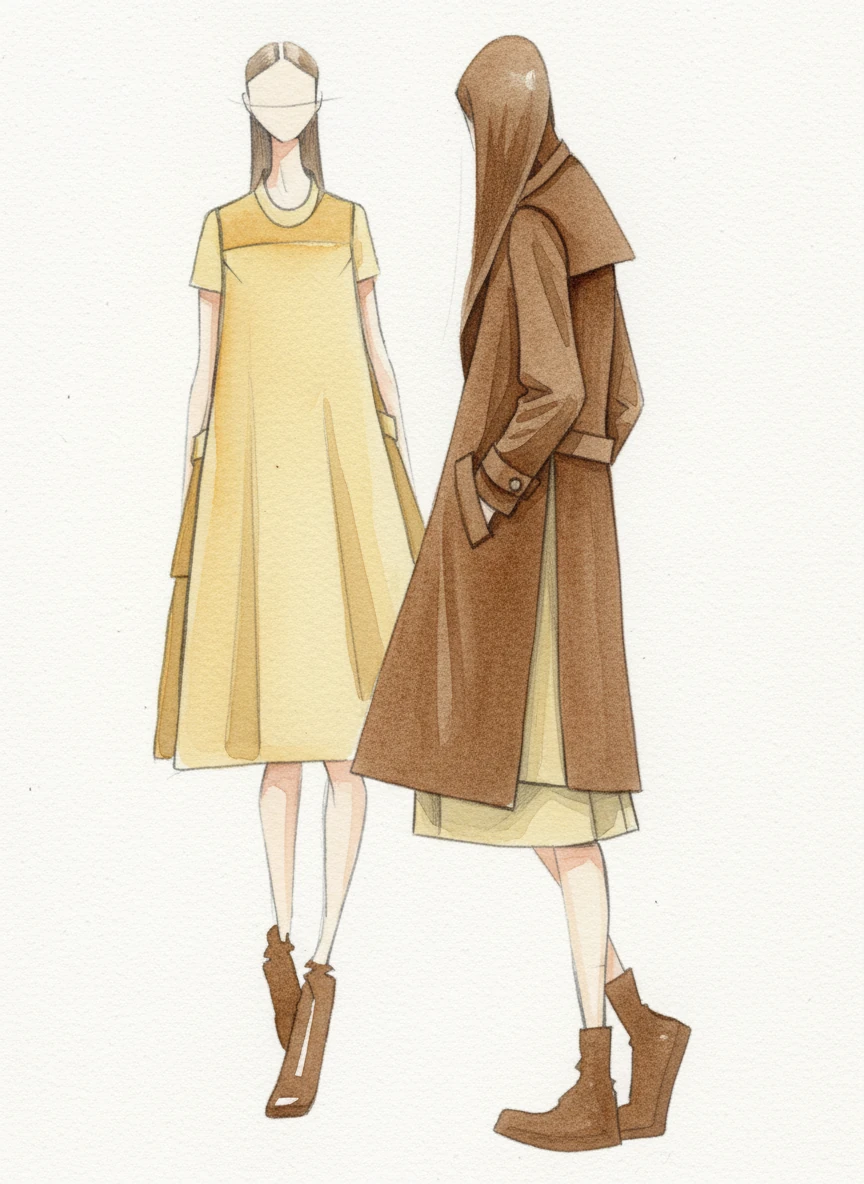
transform this sketch (image 1) into a water color hand drawn illustration of a piece of garment in two views, apply it with mostly light yellow and brown  wool fabric. maintain all design details of the garment from the original sketch, just fill colour and texture to it. output the drawing using the water colour visual style from image 2.

transform this sketch (image 1) into a water color hand drawn illustration of a piece of garment in two views, apply it with mostly light yellow and brown wool fabric. maintain all design details of the garment from the original sketch, just fill colour and texture to it. output the drawing using the water colour visual style from image 2.

Nano Banana•Image to Image3 credits

Best Model: Flux for sketch-to-image transformation, then Nano Banana for high-fidelity refinement and detail control.


Method 3: Reference-Based Fashion Design

Best for: Variations of existing designs and brand-aligned trend adaptation.

Sometimes you already have a hero piece or an inspiration look. You want variations, not random new designs.

Workflow:

  1. Upload a reference – A product shot, runway look, or brand campaign image.
  2. Specify what changes – Colors, patterns, fabrics, or silhouette tweaks.
  3. Generate variations – AI keeps the core idea while exploring options.
  4. Compare and select – Choose the strongest designs for further work.

Example Applications:

  • Adapting runway trends to your brand’s price point and customer
  • Creating seasonal colorways and capsule collections
  • Testing different prints on the same base garment
  • Creating different fits (slim, relaxed, oversized) from a hero design

Advanced Technique: Style Transfer

  • Apply the visual language of one garment to another
  • Blend elements from multiple references (e.g. sleeves from one, bodice from another)
  • Build fusion pieces that combine two aesthetics (e.g. streetwear Ă— couture)
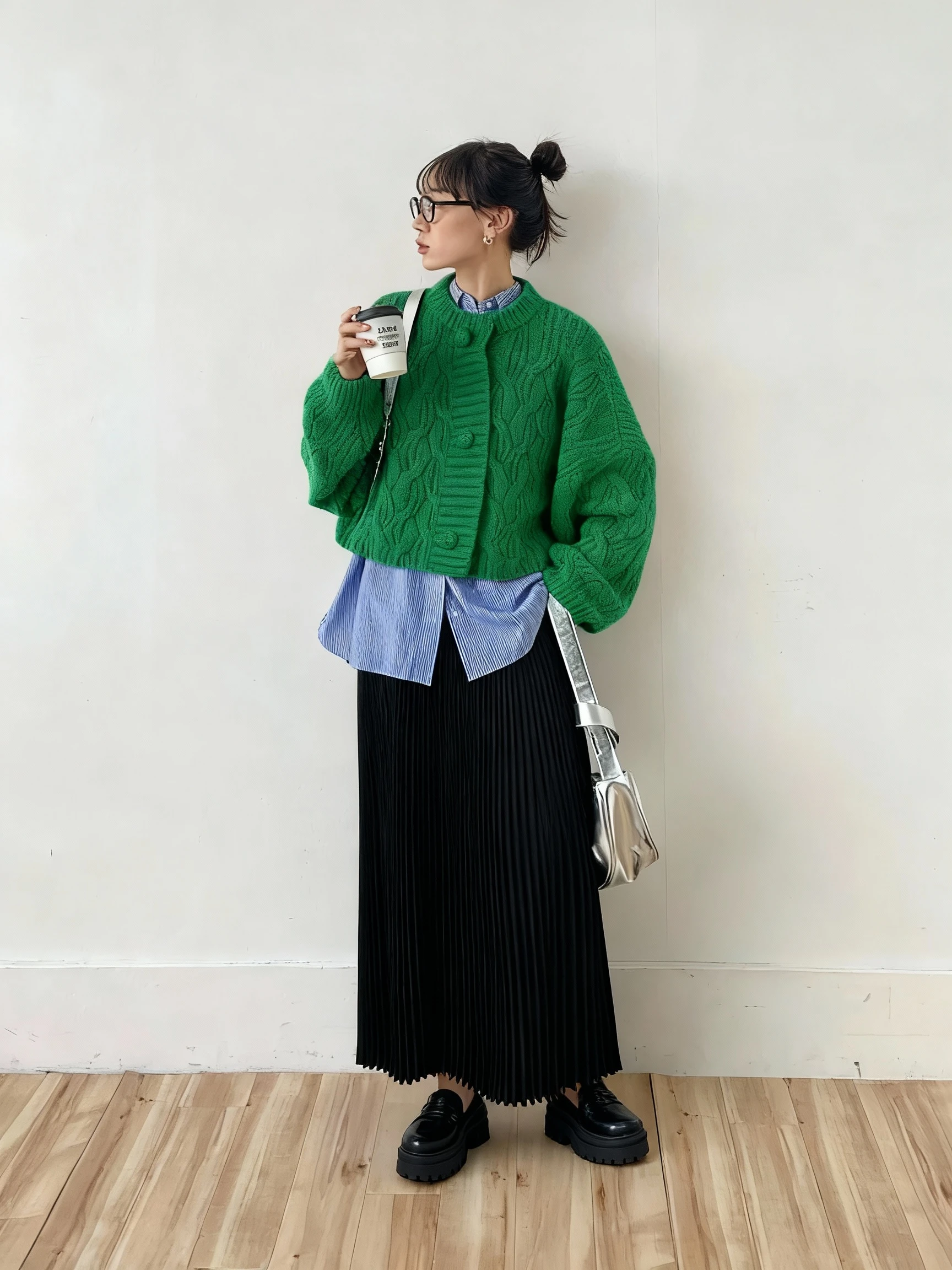
based on image 1, lets replace the sweater with the green sweater from image 2, and replace the pants with the dress from image 3.

based on image 1, lets replace the sweater with the green sweater from image 2, and replace the pants with the dress from image 3.

Seedream•Image to Image

Best Model: Seedream 1k for multi-image style exploration and loose reference blending, where you care more about creative variety than perfect accuracy.


Fabric Texture Visualization

Realistic Material Rendering

A major advantage of AI-assisted fashion design is material-aware rendering. Instead of imagining how a fabric might fall or shine, you can see it.

Common Fabric Types

Fabric TypeCharacteristicsBest For
Silk & SatinSmooth, lustrous, strong specular highlights and elegant drapingEvening wear, gowns, premium blouses
Denim & CanvasVisible weave, structured and sturdy, slightly matteStreetwear, jeans, jackets, workwear
Leather & SuedeRich grain, subtle gloss or nap, weightyOuterwear, accessories, premium pieces
Cotton & LinenSoft, breathable, matte, sometimes with light creasingEveryday wear, resort, summer collections
Knits & WoolVisible stitch or fiber texture, cozy volumeSweaters, cardigans, winter collections

Fabric Specification in Prompts

You can steer materials directly in the prompt:

Oversized blazer, Italian wool fabric, herringbone pattern, charcoal gray, structured shoulders, professional styling

Summer dress, lightweight linen, natural beige, relaxed fit, breathable texture, beach resort aesthetic

Leather jacket, distressed black leather, vintage finish, asymmetric zipper, motorcycle style, urban fashion
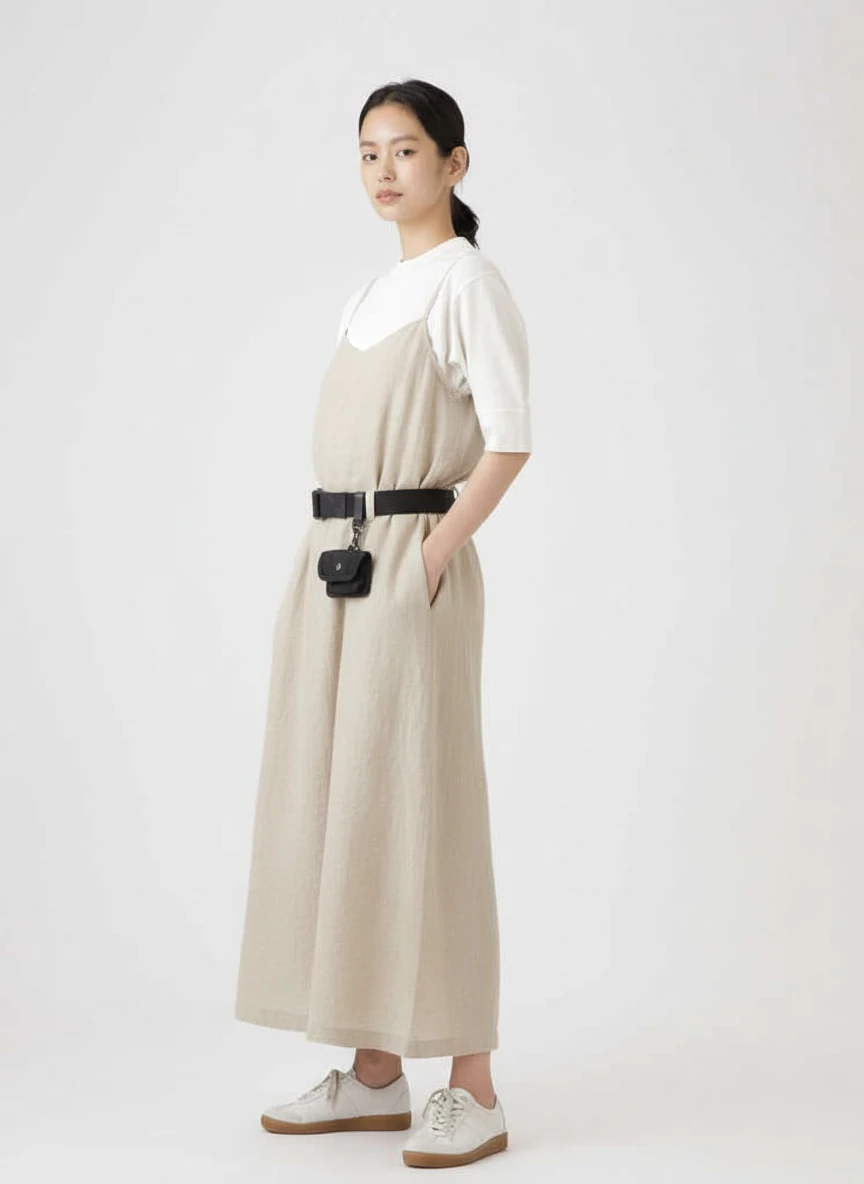
let's replace the pants with a summer dress, lightweight linen, natural beige, relaxed fit, breathable texture, beach resort aesthetic. keep the t-shirt and the rest of the image unchanged.

let's replace the pants with a summer dress, lightweight linen, natural beige, relaxed fit, breathable texture, beach resort aesthetic. keep the t-shirt and the rest of the image unchanged.

Nano Banana•Image to Image3 credits

Best Model: Nano Banana for consistent, realistic fabric textures across many styles and lighting conditions.


Style Variations & Collections

Generating Fashion Collections

Instead of working one garment at a time, you can think in collections.

Seasonal Collection Workflow

1. Define the collection direction

  • Season (SS / FW)
  • Aesthetic (minimalist, romantic, urban, luxury, streetwear)
  • Color palette (e.g. warm earth tones, monochrome, jewel tones)
  • Target customer and price positioning

2. Generate core silhouettes

  • Dresses
  • Tops & blouses
  • Bottoms (pants, skirts, shorts)
  • Outerwear
  • Key accessories

3. Expand into variations

  • Colorways for each design
  • Alternative fabrics (e.g. cotton vs silk vs denim)
  • Length and fit options
  • Details such as trims, closures, and embellishments

Example Collection Prompt:

Spring/Summer womenswear collection, minimalist aesthetic, neutral earth tones (beige, cream, sage green), natural fabrics (linen, cotton), flowing silhouettes, sustainable fashion, clean studio photography
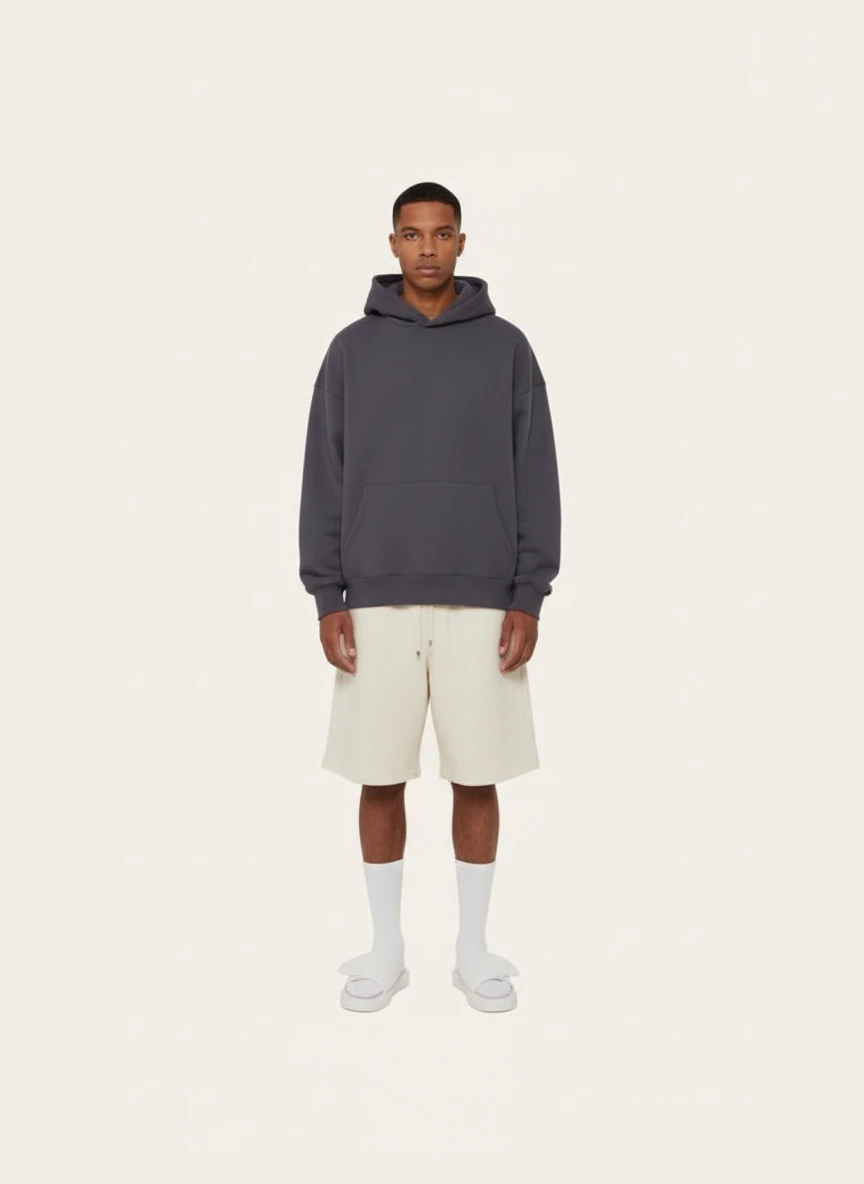
Based on the current lookbook, extracting styles and colours from it, and create a new image of one model wear some new pieces of garment  - A hoodie in dark colour, and light color shorts, on beige background like the original image. remove the line on the edge of the image, keep out put with clean background.

Based on the current lookbook, extracting styles and colours from it, and create a new image of one model wear some new pieces of garment - A hoodie in dark colour, and light color shorts, on beige background like the original image. remove the line on the edge of the image, keep out put with clean background.

Nano Banana•Image to Image3 credits

Best Model: Nano Banana for cohesive, collection-wide generation where pieces feel like part of the same universe.


Color & Pattern Variations

Once you have a strong base design, AI is ideal for systematic variation.

Base Design:

  • Knee-length A-line dress with short sleeves and a clean neckline

Color Variations:

  • Navy blue / burgundy / forest green / mustard yellow / black

Pattern Variations:

  • Florals, stripes, geometrics, micro-prints, bold graphics

Workflow:

  1. Lock in a base garment visual.
  2. Use precision editing to change only the garment color or pattern.
  3. Generate several versions in a batch.
  4. Compare on a grid to select final SKUs.
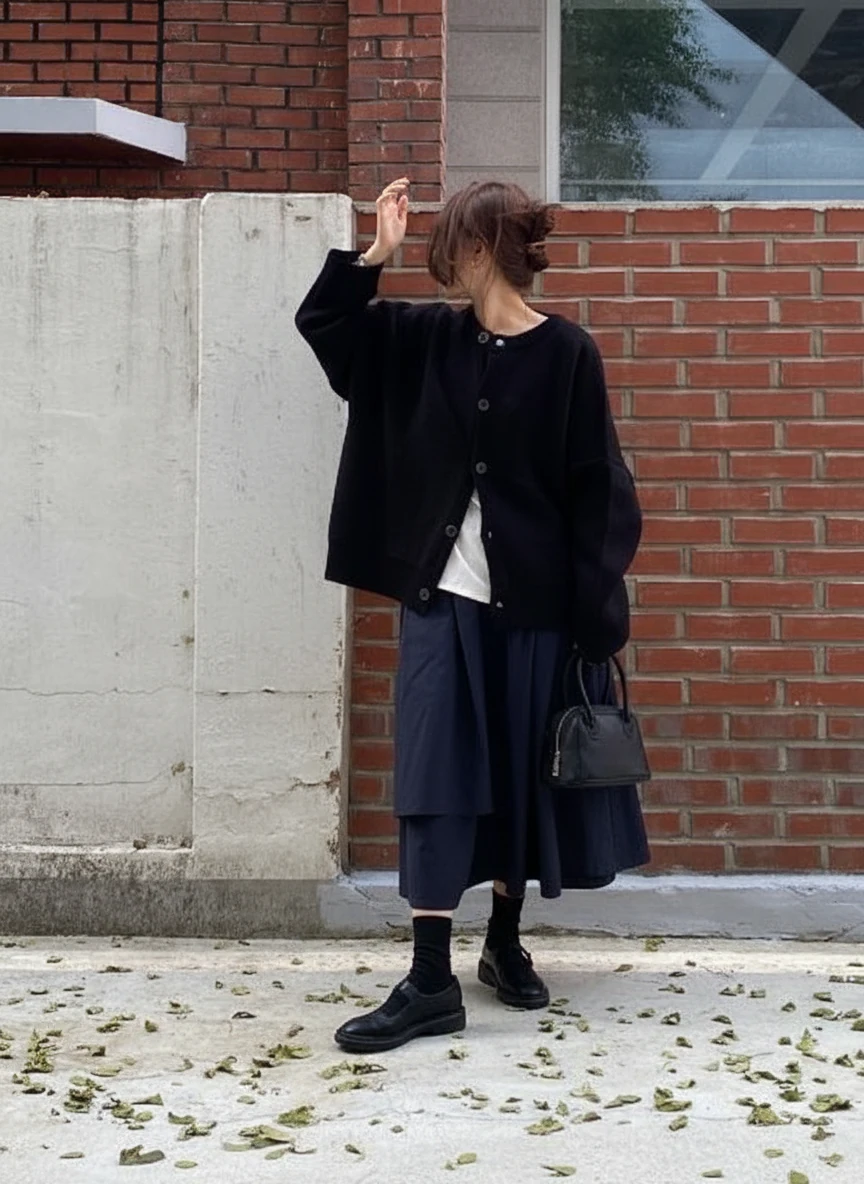
change the dress's color to navy blue, and keep the rest unchanged

change the dress's color to navy blue, and keep the rest unchanged

Nano Banana•Image to Image3 credits

Best Model: Nano Banana for stable structure across many color and pattern changes.


Advanced Fashion Design Techniques

These techniques are useful when you need more than “a nice picture”—you need design decisions you can stand behind.

Garment Detail Enhancement

Focus Areas:

  • Necklines: V-neck, square, sweetheart, boat neck, halter, off-shoulder
  • Sleeves: Puff, bell, cap, balloon, sleeveless, elongated cuffed
  • Hemlines: Asymmetric, high-low, ruffled, slit, straight cut
  • Closures: Buttons, zippers, hooks, ties, wrap fronts
  • Embellishments: Embroidery, lace panels, beading, appliquĂ©, cut-outs
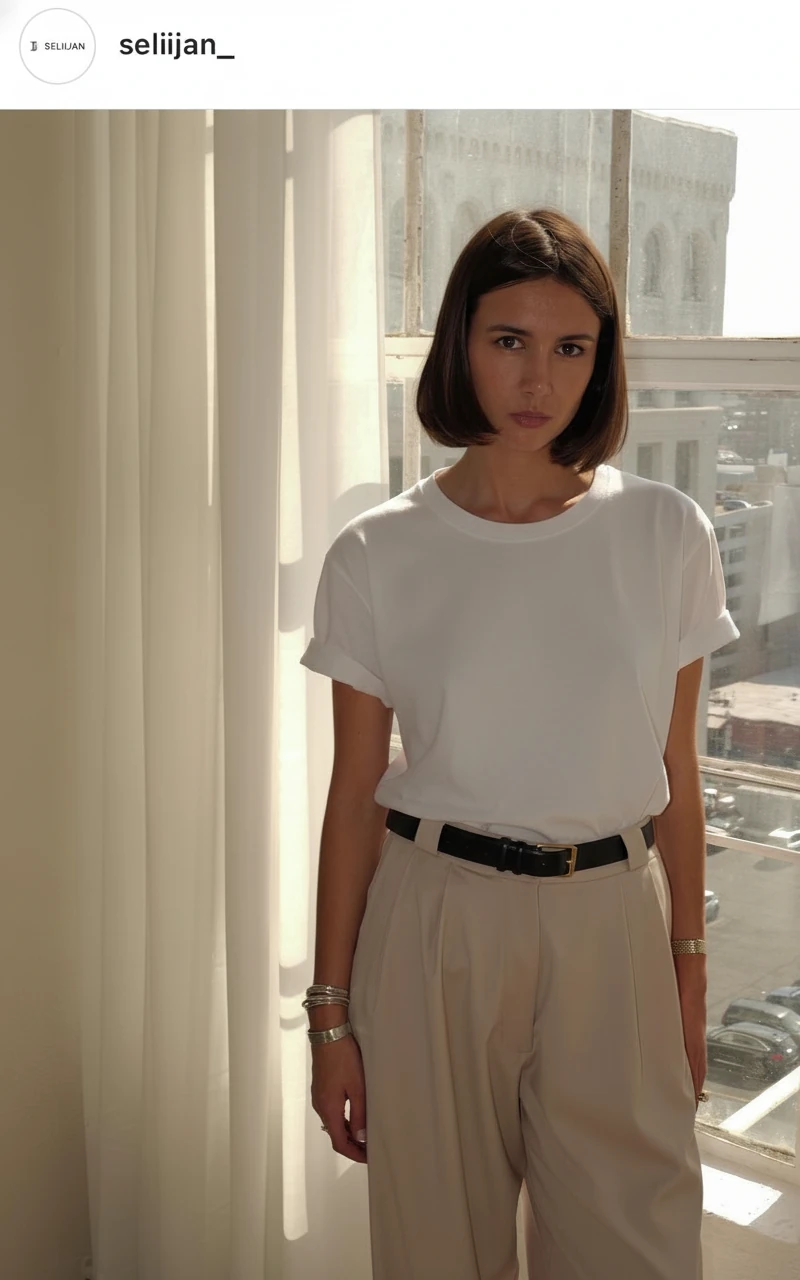
turn the t-shirt sleeves into a roll-up style sleeve, and keep everything else unchanged.

turn the t-shirt sleeves into a roll-up style sleeve, and keep everything else unchanged.

Nano Banana•Image to Image2 credits

Use Nano Banana with precision editing:

  • Mask only the area you want to change
  • Describe the detail accurately
  • Keep the rest of the garment locked to avoid unwanted drift

Best Model: Nano Banana for local, detail-level adjustments on an otherwise final design.


Outfit Composition

Beyond single garments, you can generate full looks that communicate styling intent.

Example Outfit:

  • Silk ivory blouse with bow detail
  • High-waisted wide-leg trousers in camel
  • Tailored neutral blazer
  • Leather belt with subtle gold hardware

Styling Considerations:

  • Color harmony between pieces
  • Balance of volume (fitted vs oversized)
  • Occasion (office, evening, streetwear, resort)
  • Seasonal layering
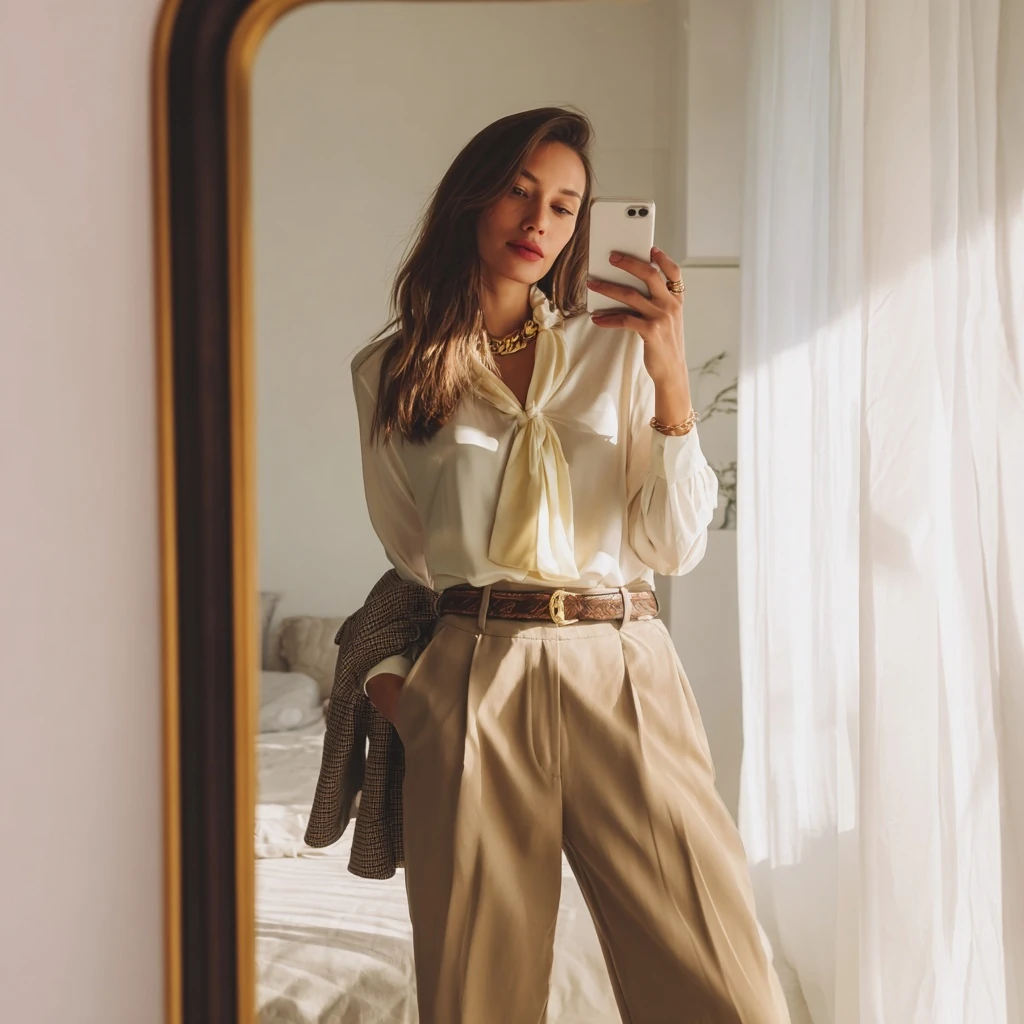
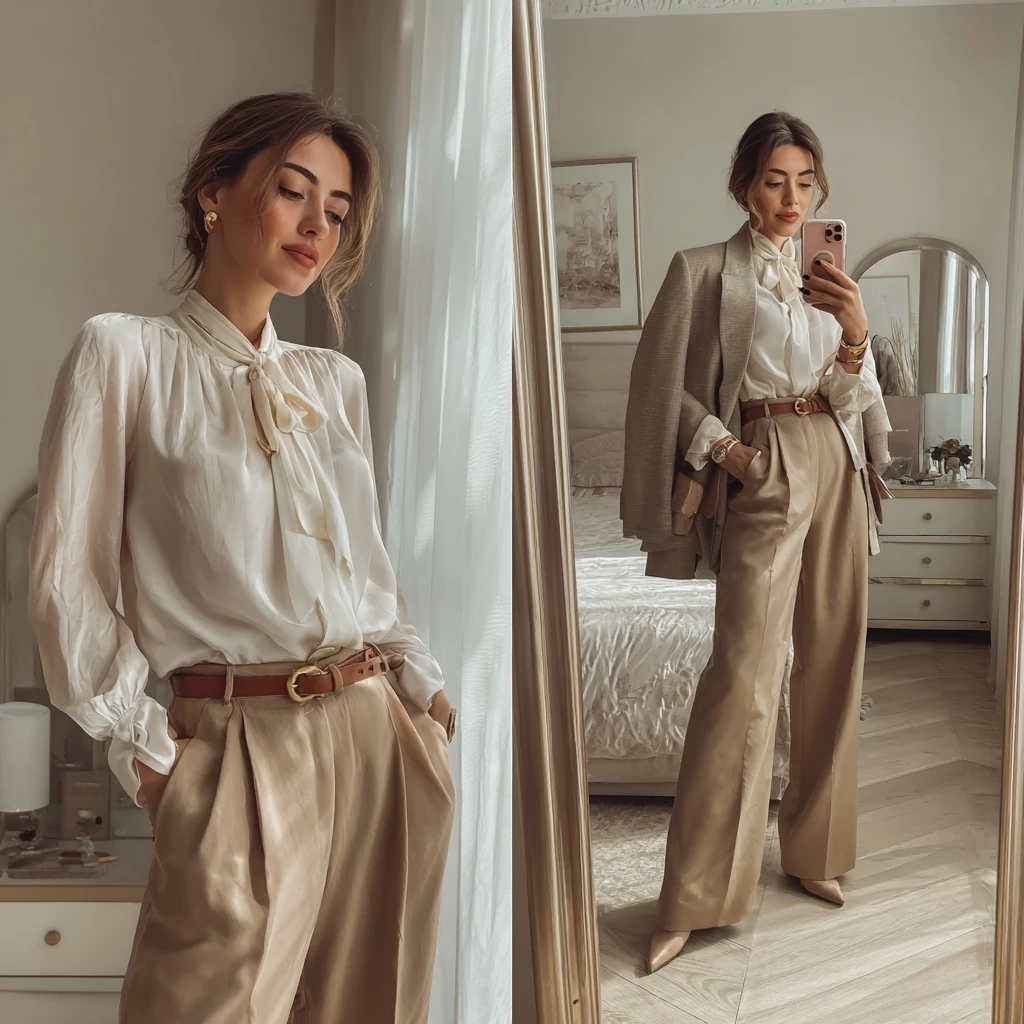
Let's create a fashion model wearing the following garments and accessories posing in front of a mirror in a bedroom.

- Top: Silk blouse, ivory, bow detail
- Bottom: High-waisted trousers, wide leg, camel
- Outerwear: Tailored blazer, neutral beige
- Accessories: Leather belt, gold hardware

natural lighting, bright room, realistic mobile phone photo style.Let's create a fashion model wearing the following garments and accessories posing in front of a mirror in a bedroom.

- Top: Silk blouse, ivory, bow detail
- Bottom: High-waisted trousers, wide leg, camel
- Outerwear: Tailored blazer, neutral beige
- Accessories: Leather belt, gold hardware

natural lighting, bright room, realistic mobile phone photo style.Let's create a fashion model wearing the following garments and accessories posing in front of a mirror in a bedroom.

- Top: Silk blouse, ivory, bow detail
- Bottom: High-waisted trousers, wide leg, camel
- Outerwear: Tailored blazer, neutral beige
- Accessories: Leather belt, gold hardware

natural lighting, bright room, realistic mobile phone photo style.Let's create a fashion model wearing the following garments and accessories posing in front of a mirror in a bedroom.

- Top: Silk blouse, ivory, bow detail
- Bottom: High-waisted trousers, wide leg, camel
- Outerwear: Tailored blazer, neutral beige
- Accessories: Leather belt, gold hardware

natural lighting, bright room, realistic mobile phone photo style.
3 / 4

Let's create a fashion model wearing the following garments and accessories posing in front of a mirror in a bedroom. - Top: Silk blouse, ivory, bow detail - Bottom: High-waisted trousers, wide leg, camel - Outerwear: Tailored blazer, neutral beige - Accessories: Leather belt, gold hardware natural lighting, bright room, realistic mobile phone photo style.

Midjourney•Text to ImageFast4 credits

Best Model: MidJourney for editorial-style outfits and fashion-forward compositions.


Model & Presentation Styling

How you present a garment matters as much as the garment itself.

Common Presentation Styles:

  • Studio product shots – Clean background, even lighting
  • Editorial / campaign – On-location, atmospheric scenes
  • Flat lays – Garments laid flat for ecommerce and social
  • On hanger / rack – Retail and showroom style
  • Model poses – Catalog versus editorial posing

You can specify:

  • Background type (studio, street, runway, nature)
  • Camera angle (full body, three-quarter, close-up)
  • Lighting (soft, high key, dramatic, backlit)
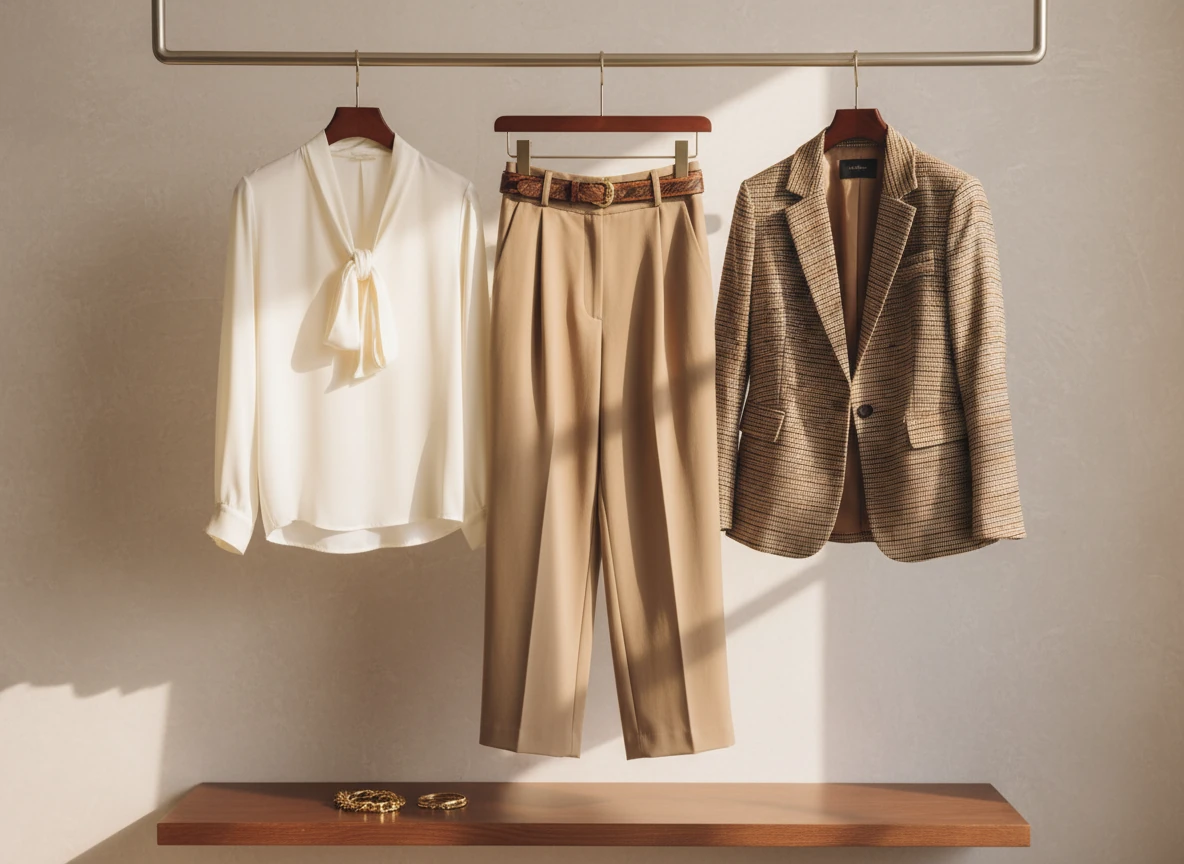
let's use the garment pieces from the image, and make a new image that shows them in hanger display style with a retail presentation look.

Make sure the garments (shirt/pants/blazer) are hang on three separate hanger. no model present.

let's use the garment pieces from the image, and make a new image that shows them in hanger display style with a retail presentation look. Make sure the garments (shirt/pants/blazer) are hang on three separate hanger. no model present.

Nano Banana•Image to Image3 credits

Technical Flats

When visuals need to become production docs, you can generate technical flats that are clean and readable.

Technical Flat Prompt:

Technical flat sketch, women's blazer, front view, single-breasted, two-button closure, notched lapel, flap pockets, center back vent, clean line drawing

Flats are useful to:

  • Communicate construction to pattern makers
  • Document seam placements and panel breakdowns
  • Show hardware and closure detail
  • Keep a consistent spec style across a collection
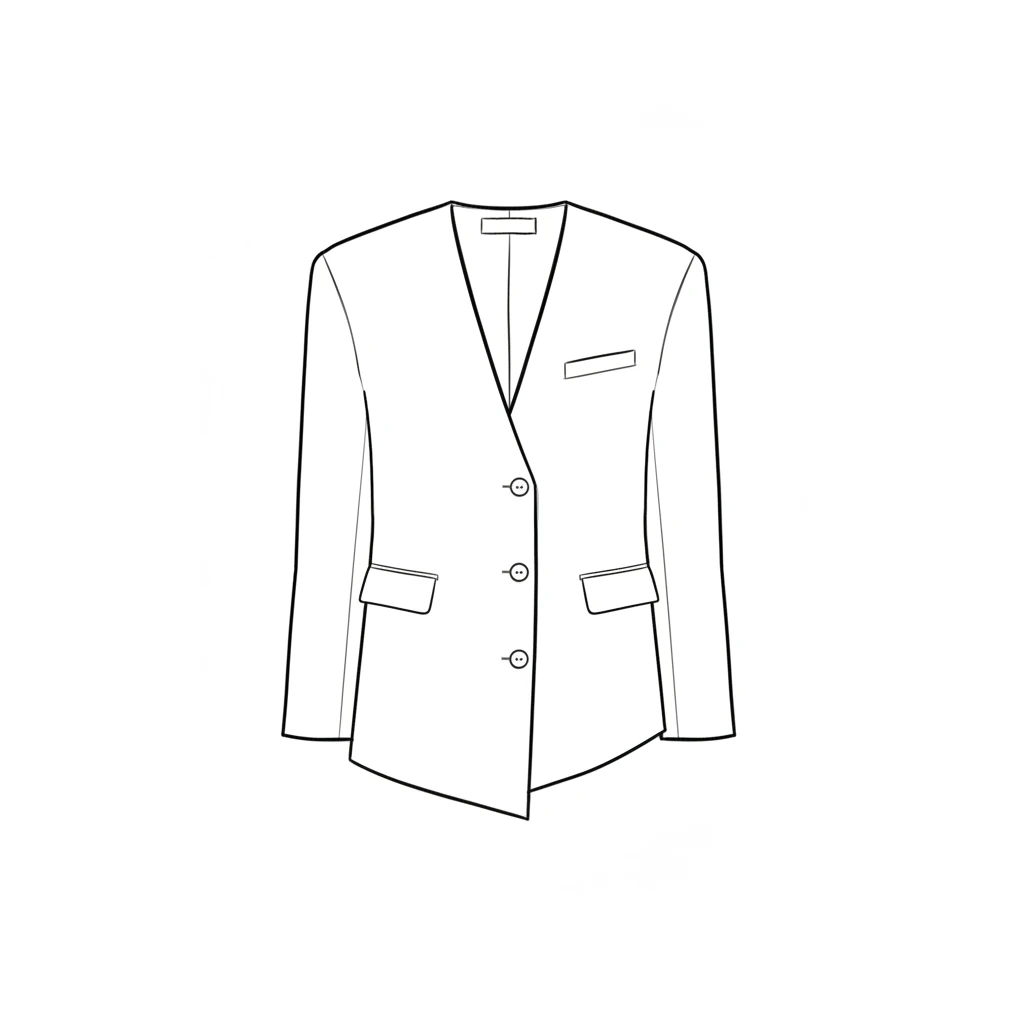
Based on the provided blazer garment design, let's create a technical flat sketch on this women's blazer, front view, pay attention to the design details of it, three buttons, proportion, with a clean line drawing

Based on the provided blazer garment design, let's create a technical flat sketch on this women's blazer, front view, pay attention to the design details of it, three buttons, proportion, with a clean line drawing

Nano Banana•Image to Image3 credits

Best Model: Nano Banana for crisp lines and geometry-aware drawings.


Real-World Fashion Workflows

End-to-End Design Pipeline: Concept → Collection → Presentation

Multi-Model Pipeline Example:

  1. Explore silhouettes & moods – MidJourney / Flux
  2. Lock in key looks & fabrics – Nano Banana
  3. Refine details & variations – Nano Banana with precision editing
  4. Generate colorways & accessories – Batch variations
  5. Prepare client decks & ecommerce assets – Export at final resolution

Time: Often 2–3 hours instead of 2–3 days for comparable manual output.

Runway Trend Adaptation

  • Upload runway images and brand reference boards
  • Use Flux or Seedream for blended, brand-aligned looks
  • Refine with Nano Banana for fabric and detail consistency
  • Generate technical flats for shortlisted designs

Collection Development

  • Build an AI-based moodboard directly in Banana Designer
  • Generate silhouettes and styling variations aligned to that mood
  • Use multi-image views to see outfits side-by-side
  • Export selected looks for sampling, line sheets, or lookbooks

Time: 2–3 days for a robust concept vs 2–3 weeks traditionally.


Choosing the Right Model in Banana Designer

Banana Designer gives you multiple models in one workspace so you can pick the best tool for each stage.

TaskBest ModelWhyBanana Designer Advantage
Creative exploration & moodMidJourney, FluxBold, expressive conceptsSwitch models without leaving the project
Photorealistic garments & fabricsNano BananaDetail and fabric fidelityCombine with Precision Editing for final tweaks
Reference-based style transferSeedream, FluxBlending trends and brand languageMulti-image upload and comparison
Technical flats & line workNano BananaClean geometry and line clarityEdit flats and renders in the same file
Color & pattern systemsNano BananaStructural consistencyBatch variations with stable silhouette

Banana Designer’s multi-model advantage: You keep your project, history, and masks, even as you switch between models.

Learn more about model selection →


Integration with Other Workflows

AI fashion design rarely lives alone—it feeds into the rest of your workflow.

You can move from design exploration to ecommerce-ready assets inside the same ecosystem.


Frequently Asked Questions

Q: How is Banana Designer different from other AI image generators?
A: It’s built for iterative design work. You get precision editing, multi-model access, and full history tracking, which means you can refine existing images instead of regenerating from scratch every time.

Q: Can I switch between models mid-project?
A: Yes. Start with MidJourney or Flux for exploration, then switch to Nano Banana for photorealism and detail work. Your masks, crops, and history stay intact.

Q: Do I need prompt-engineering skills?
A: No. Banana Designer includes a visual Prompt Composer where you select silhouettes, fabrics, and moods from structured options. You can still write advanced prompts manually if you prefer.

Q: How does Precision Editing help in fashion?
A: You can mask specific areas—like necklines, sleeves, or hems—and change only those parts. This is ideal for testing detail variations on a design that’s otherwise final.

Q: Can I use multiple reference images together?
A: Yes. Upload several inspiration images and blend them. For example, use the silhouette from one piece, the fabric from another, and the color palette from a lookbook.

Q: Are the generated designs commercially usable?
A: Yes. You can use the visuals commercially. For manufacturing, work with pattern and technical design teams to translate AI visuals into production-ready specs.


Next Steps

Learn More Design Workflows

With Banana Designer, AI becomes a fashion design assistant—not a replacement. You stay in control of the ideas; AI handles the endless variations, rendering, and visualization work in between.

Add your prompt or example prompts from the article